
If you have spent any time trying to explain Microsoft Fabric costs to leadership, you already know the pain. On paper, Fabric looks simple. You buy capacity. You run workloads. You pay a predictable price.
In reality, it rarely stays that clean.
Capacities get paused and resumed. SKUs are scaled up for peak workloads. Reservations are purchased with the promise of savings. Extra features quietly introduce additional charges. Before long, the question becomes uncomfortable and familiar.
Why does this bill look higher than expected?
This challenge matters because Microsoft Fabric is the fastest-growing data platform in Microsoft’s history, already adopted by more than 28,000 customers. For many organizations, the capacity model is not just confusing, it is the single biggest blocker to broader adoption.
That is exactly the problem Fabric Cost Analysis (FCA) was built to solve.
FCA is a free, open source solution built entirely on Fabric itself. It provides transparency into Fabric costs, highlights optimization opportunities, and introduces a GenAI-powered way to ask cost questions in plain language. It does not just track spend. It builds trust, reduces friction, and enables confident decision-making around Fabric usage.
This post breaks FCA down SQLYard-style. We will cover why Fabric costs are tricky, how FCA works, what data it uses, what it outputs, and how you can deploy it. We will finish with practical guidance and final thoughts.
Why Microsoft Fabric Costs Feel Harder Than Expected
At a high level, Fabric uses a capacity-based pricing model. You purchase a capacity SKU and workloads consume compute within that boundary. Sounds simple.
The complexity shows up in real-world scenarios.
- Capacities can be paused and resumed, affecting hourly billing.
- Scaling up or down changes cost immediately.
- Not everything is included in capacity pricing.
- Azure reservations may or may not actually save money.
- Azure quotas introduce usage constraints that affect both performance and spend.
On top of that, cost data is scattered. Some details live in Azure billing exports. Some live in Fabric metrics. Some live only in documentation. Trying to stitch all of this together manually is time-consuming and error-prone.
For FinOps teams, this makes chargeback and showback difficult. For engineering teams, it creates friction when justifying capacity changes. For leadership, it erodes confidence.
What Is Fabric Cost Analysis (FCA)?
Fabric Cost Analysis is a free, open source solution available on GitHub that brings all Fabric cost signals into a single, explainable model.
It was developed by a multidisciplinary team with deep experience in FinOps, data platforms, and go-to-market strategy, led by Romain Casteres and supported by Cedric Dupui, Manel Omani, and Antoine Richet.
The goal was simple but ambitious. Turn Fabric cost confusion into a strategic advantage.
FCA answers the questions people actually ask.
What are we really paying for
What is included versus extra
Are reservations delivering value
Where can we optimize
How do we explain this clearly to leadership
It is important to note that FCA is a solution accelerator, not an official Microsoft product. There is no formal Microsoft support. It is community-driven and used at your own risk. In practice, it is robust, well-designed, and already deployed successfully at multiple customers.
FCA Architecture Overview


At a high level, FCA uses Fabric to monitor Fabric. It is intentionally self-referential and showcases the platform end to end.
Here is how the architecture fits together.
Cost and usage data flows into Fabric through Pipelines and Notebooks. Raw data is stored in a Fabric Lakehouse. From there, curated Delta Parquet tables are created for analytics. Power BI accesses these tables using Direct Lake, enabling fast and interactive reporting without duplication.
On top of the curated model sits a Fabric Data Agent. This GenAI-powered agent allows users to explore cost data using natural language.
From ingestion to insight, everything runs natively on Fabric.
FCA Inputs: What Data Does It Use?
FCA focuses exclusively on Microsoft Fabric costs. Other Azure services are filtered out by design.
Azure Cost Data in FOCUS Format
The foundation of FCA is Azure billing data using the FinOps Open Cost and Usage Specification, commonly known as FOCUS. This provides a normalized and analysis-ready cost model that works across time, subscriptions, and regions.
This is critical. Without normalization, cost comparisons and trend analysis quickly fall apart.
Enriched Documentation Data
FCA enriches raw cost data with reference information pulled from Microsoft documentation. This adds definitions, explanations, and context that make reports understandable to non-technical audiences.
This is one of the reasons FCA works well in leadership conversations. Numbers come with meaning.
Azure Reservations (Optional)
If your organization uses reservations for Fabric capacities, FCA can ingest reservation data and show whether those reservations are actually producing savings.
Many teams assume reservations are always beneficial. FCA lets you validate that assumption with evidence.
Azure Quotas (Optional)
Quota data provides visibility into usage versus limits. This helps with both cost control and capacity planning, especially when teams push Fabric harder over time.
FCA Outputs: What Do You Get?
Once data is ingested and modeled, FCA delivers two primary outputs.
Power BI Cost Reports


The Power BI reports are the heart of FCA. Each page is designed around a real FinOps scenario.
The Home and Summary pages provide a clear separation between costs covered by capacity and additional charges. This alone solves a major pain point when explaining spend internally.
Other report pages focus on specific use cases.
- Capacity Usage identifies underutilized or overloaded capacities.
- Reservations validates whether reserved instances are saving money.
- Cost Detail enables granular analysis and forecasting.
- Quotas tracks limits and consumption.
- Support explains billing nuances and metrics.
The reports can be used as-is or extended using the underlying semantic model.
Fabric Data Agent (GenAI)

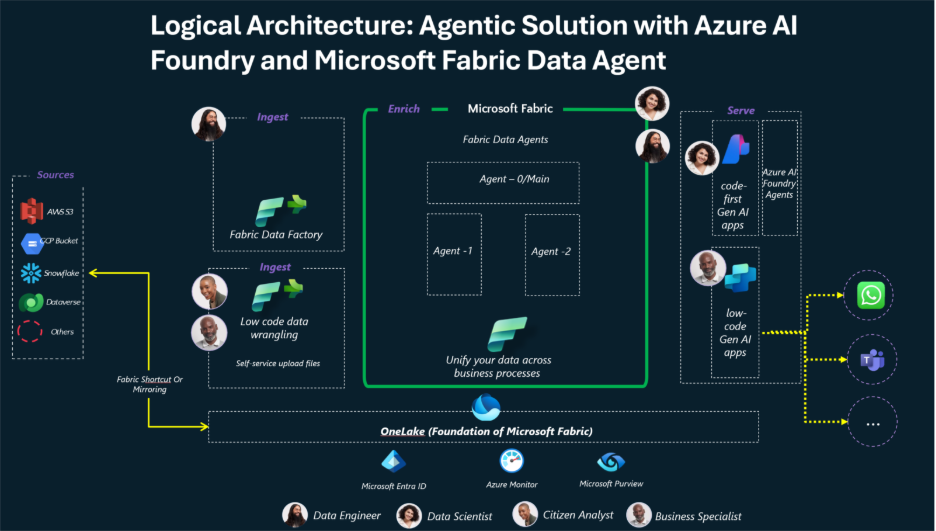
The Fabric Data Agent is where FCA becomes accessible to everyone.
Users can ask questions like:
Which Fabric capacities cost the most this quarter
How have Fabric costs trended over the last six months
The agent retrieves answers directly from the FCA semantic model. It supports multiple languages and can be accessed through the web or Microsoft Teams.
This capability removes a huge barrier. Cost analysis is no longer locked behind Power BI skills or SQL queries. Anyone can ask and get a trustworthy answer.
Workshop: Exploring FCA Like a Data Pro
This workshop walks from novice to advanced, SQLYard style.
Step 1: Deploy FCA
FCA is distributed through the Microsoft Fabric Toolbox on GitHub. Deployment is automated and guided. A one-click process provisions pipelines, notebooks, a Lakehouse, datasets, and reports.
Prerequisites include Fabric workspace permissions and access to Azure billing data. Most deployments complete in minutes.
Step 2: Inspect Raw Cost Data
Open the Lakehouse and explore the raw FOCUS cost tables. Look for familiar fields like subscription, resource, region, usage date, and cost.
This is a great place to validate ingestion and build trust in the numbers.
Step 3: Explore Curated Tables
Move to the curated Delta tables. These are optimized for analytics and Direct Lake access.
At this stage, you can run SQL queries directly against the Lakehouse to answer custom questions.
Example:
SELECT
    CapacityName,
    SUM(Cost) AS TotalCost
FROM FabricCosts
WHERE UsageDate >= DATEADD(month, -3, GETDATE())
GROUP BY CapacityName
ORDER BY TotalCost DESC;
This query quickly shows which capacities are driving the most spend.
Step 4: Review Power BI Reports
Open the Summary and Capacity Usage pages. Look for patterns.
Are some capacities consistently underutilized
Are others frequently maxed out
Do reservations align with usage
These insights usually surface optimization opportunities immediately.
Step 5: Ask the Data Agent
Finally, use the Data Agent. Ask high-level questions and validate answers against the reports.
This step is powerful for stakeholder demos. It shows how cost transparency becomes conversational instead of confrontational.
Community, Events, and Support
FCA has been presented globally, including at FabCon Vienna and Microsoft AI Tour events across Latin America.
Support is handled entirely through GitHub issues. Bugs, questions, and feature requests are tracked openly and actively addressed by the community and maintainers.
Do not open Microsoft support tickets for FCA. This is a community-supported solution by design.
Final Thoughts 💡
Fabric Cost Analysis turns one of the most frustrating aspects of Microsoft Fabric into a strength.
By combining normalized cost data, clear reporting, and GenAI-driven exploration, FCA helps organizations understand what they are paying for, optimize usage, and explain costs with confidence.
Built by practitioners, shaped by real customer questions, and shared freely with the community, FCA removes a major adoption barrier and replaces it with trust.
If you are running Fabric capacities or planning to, FCA is worth deploying. It demystifies billing, supports FinOps best practices, and helps teams move from hesitation to expansion.
That is exactly what a modern data platform needs.
References
- Microsoft Fabric documentation
- FinOps Open Cost and Usage Specification (FOCUS)
- Fabric Cost Analysis GitHub repository
- Microsoft Fabric Toolbox
- FabCon Vienna conference materials
- Microsoft AI Tour presentations
Discover more from SQLYARD
Subscribe to get the latest posts sent to your email.

